Video content is more popular than ever in the United States. From YouTube creators and TikTok influencers to small business owners and students, almost everyone is looking for ways to create high-quality videos. However, many professional editing programs are complicated, expensive, or take months to learn.
This is where the Wondershare Filmora video editor comes in. Known for its simple layout, modern features, and affordable pricing, Filmora has become one of the most popular video editing programs for people who want great results without a steep learning curve.
In this in-depth review, we’ll take a closer look at Wondershare Filmora, its features, pricing, pros and cons, and whether it’s the right choice for your video editing needs.
What Is Wondershare Filmora?
Wondershare Filmora is a beginner-friendly video editing software developed by Wondershare Technology. It is designed to give users the power of professional editing without making it confusing. Available for both Windows and macOS, Filmora also has versions for mobile devices, making it convenient for creators who like to edit on the go.
Unlike some editing programs that overwhelm new users with hundreds of buttons and tools, Wondershare Filmora focuses on simplicity. Its drag-and-drop interface allows anyone, even with zero editing experience, to create polished videos in a matter of minutes.
Over the years, Filmora has grown from a basic editor into a powerful tool. With the addition of AI features, stock media, templates, transitions, and advanced effects, it now competes with some of the bigger names in the video editing industry.
Why Is Wondershare Filmora So Popular in the USA?
In the USA, content creation is booming. Millions of Americans are creating videos for YouTube, Instagram Reels, TikTok, Facebook, and even for their online businesses. Most of these creators don’t want to spend years learning complicated software like Adobe Premiere Pro.
Wondershare Filmora is popular across the United States because it strikes the perfect balance between ease and functionality. It is affordable compared to many high-end editors, runs well on most computers, and has all of the tools the average creator needs.
Whether you’re a college student making a class project, a small business in America promoting your products, or an aspiring YouTuber building your channel, Filmora gives you everything you need without the frustration.
Easy-to-Use Interface
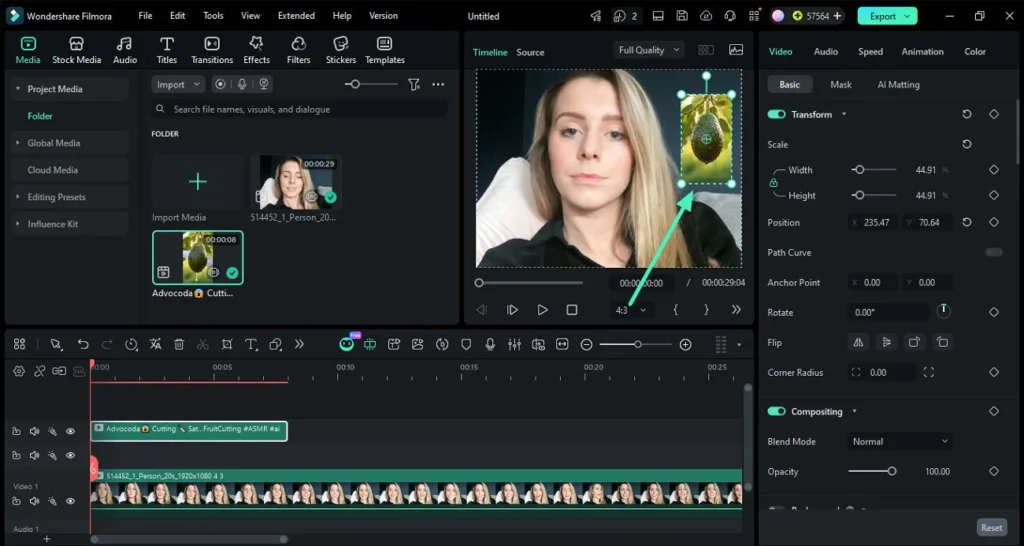
One of the biggest reasons people choose the Wondershare Filmora video editor is its clean and user-friendly interface. As soon as you open the program, you’re greeted with options to create a new project, choose your video aspect ratio, or browse through ready-made templates.
The timeline layout will look familiar if you’ve used any editor before, but Filmora simplifies it. All of the important tools, such as video clips, audio, text, transitions, effects, and elements, are clearly labeled and easy to find.
The drag-and-drop functionality makes editing incredibly simple. You can drag your videos, images, or music directly onto the timeline, trim them with a click, and arrange them however you’d like. For beginners in the USA who have never edited a video before, this ease of use is one of Filmora’s strongest advantages.
Key Features of Wondershare Filmora
Wondershare Filmora is packed with useful features that help users create professional-looking videos without needing professional experience. Let’s take a look at some of its best tools.
1. AI-Powered Editing Tools
Filmora has invested heavily in AI technology in recent versions. These smart tools save time and help creators edit faster. Some of the helpful AI features include:
- AI Smart Cutout: Easily remove backgrounds from videos or images without needing a green screen.
- AI Copilot: Acts as your editing assistant and can help you with tasks or ideas while editing.
- AI Text-to-Video: Generate video clips based on a text prompt.
- AI Audio Denoise: Removes unwanted background noise from your recordings.
- AI Script Generator: Helps YouTubers and content creators generate video scripts in seconds.
- AI Thumbnail Creator: Design eye-catching YouTube thumbnails right inside Filmora.
These AI tools are extremely useful for busy creators in the USA who want to produce more content in less time.
2. Drag-and-Drop Timeline
Filmora’s timeline is flexible, smooth, and easy to understand. You can split, trim, crop, merge, rotate, or speed up your clips with just a few clicks. Unlike more complex programs, you don’t need to watch hours of tutorials to learn the basics. Most users can start editing within their first 15 minutes of using Wondershare Filmora.
3. Transitions, Effects, and Filters
Every great video needs a little style. Filmora offers a large library of transitions, visual effects, filters, overlays, and motion elements. Whether you’re making a travel vlog, a wedding video, a promotional ad, or a TikTok clip, you’ll find plenty of creative options.
The effects are modern and updated often, which helps your videos look fresh and engaging instead of outdated.
4. Text, Titles, and Animations
Adding text to your videos is simple with Filmora. It includes hundreds of title templates, lower thirds, intro animations, and credits. You can customize the font, color, size, animation, and timing to match your brand.
This is especially helpful for American small business owners who want to add their logo, website, or contact information to their marketing videos.
5. Music, Sound Effects, and Audio Tools
Audio can make or break a video. Wondershare Filmora includes a built-in royalty-free music library and a large collection of sound effects. You can add background music, voiceovers, fade audio in or out, or adjust volume levels with ease.
With its audio cleanup tools, you can also improve the sound quality of recordings made with your phone, microphone, or webcam.9
6. Stock Media Library
Filmora gives users access to a built-in stock library that includes royalty-free videos, images, and music. This is a huge time-saver. Instead of searching multiple websites for content, you can find usable media directly inside the editor.
For marketers and content creators in the USA who need to create videos quickly, this feature adds a lot of value.
7. Templates for Fast Editing
One of Filmora’s most convenient features is its video templates. These pre-made templates are designed for platforms like YouTube, Instagram Reels, TikTok, Facebook Shorts, and advertisements.
All you have to do is replace the template’s clips, images, or text with your own, and your video is ready to export. This is perfect for anyone who wants professional results with very little effort.
8. Exporting and Social Media Sharing
After editing, Wondershare Filmora makes sharing your videos simple. You can export your videos in high-quality formats, including HD, Full HD, and 4K. It also has optimized export presets for popular platforms.
With one click, you can export videos sized perfectly for YouTube, TikTok, Instagram, Facebook, Vimeo, or LinkedIn. You can also save videos to your computer, burn them, or share them directly to your social channels. For USA-based creators focused on growing online, this feature is very convenient.
Who Should Use Wondershare Filmora?
Wondershare Filmora is designed for a wide range of users. It’s not made only for experts, but for everyday people who want to create videos. It is a great fit for:
- YouTubers: Create intros, tutorials, vlogs, and engaging videos with ease.
- TikTok & Reels Creators: Use vertical templates to make short-form content that grabs attention.
- Small Business Owners: Create ads, product videos, testimonials, or social media promotions to grow their business in the USA.
- Students & Teachers: Perfect for presentations, assignments, online lessons, or school projects.
- Real Estate Agents: Showcase properties with smooth video tours.
- Freelancers: Offer video editing services without investing in overly complicated software.
- Beginners: Anyone with zero editing experience can learn Filmora very quickly.
No matter your goal, the Wondershare Filmora video editor adapts well to your skill level.
Wondershare Filmora Pricing: Is It Affordable?
Pricing is one of the biggest reasons Filmora stands out from many of its competitors. High-end editors often require expensive monthly subscriptions that aren’t ideal for beginners. Wondershare Filmora offers flexible options to fit different budgets.
Generally, Filmora offers two main purchasing choices:
- Annual Subscription: Best for creators who want ongoing updates, new effects, and AI features.
- Perpetual License (One-Time Payment): This is a big plus. You pay once and own that version of Filmora forever. Very few modern editors still offer this option.
- Cross-platform/Mobile Add-ons: Depending on the plan you choose, you may have options for different devices.
Filmora also offers a free version of the software. The free version allows you to test almost all of the editing tools before buying. The only main limitation is a watermark placed on exported videos. If you want to remove that watermark and access premium effects, upgrading to a paid plan is worth it.
Compared to other video editors in the US market, Filmora is very reasonably priced, especially for the value it provides.
Pros and Cons of Wondershare Filmora
Like any software, Wondershare Filmora has its strengths and a few minor limitations. Here’s an honest breakdown:
Pros
- Beginner-friendly: The simplest editor to learn for most new users.
- Affordable: One-time payment option available, unlike many competitors.
- AI features: Modern tools that save time and boost creativity.
- Large library: Tons of effects, templates, music, titles, and stock media.
- Platform optimized: Easy exports for YouTube, TikTok, Instagram, and Facebook.
- Windows and macOS support: Runs smoothly on most computers used in the USA.
- Regular updates: Wondershare frequently adds new features, effects, and AI tools.
Cons
- Watermark on free version: You’ll need to upgrade to remove it.
- Not for Hollywood-level editing: Advanced color grading is more limited than DaVinci Resolve or Premiere Pro.
- Some premium assets: Certain effects, templates, or stock media require a paid plan.
- Heavy on older PCs: If your computer is very outdated, larger 4K projects may run a bit slower.
Overall, the pros far outweigh the cons, especially if you’re looking for an easy and practical video editor.
Wondershare Filmora vs. Its Competitors
Many Americans compare Filmora with other popular editing apps before making a decision. Here’s a simple, honest comparison:
- Filmora vs CapCut: CapCut is very popular, especially for TikTok. However, Wondershare Filmora offers a more traditional timeline, more built-in templates, and a solid one-time purchase option. CapCut often pushes its pro subscription for many premium features.
- Filmora vs Adobe Premiere Pro: Premiere Pro is powerful, but it is also expensive and difficult to learn. Filmora is much easier, more affordable, and better suited for beginners.
- Filmora vs DaVinci Resolve: DaVinci Resolve is excellent for color correction and professional work. The downside is its steep learning curve. If you want fast, good-looking videos without the complexity, Filmora is the better choice.
- Filmora vs iMovie: iMovie is free for Apple users, but it is very limited in effects, templates, and customization. Filmora offers far more creative freedom for both Windows and macOS users.
For most everyday creators in the USA, Wondershare Filmora hits the sweet spot between price, features, and simplicity.
Tips to Get the Most Out of Wondershare Filmora
If you decide to try Filmora, these tips will help you edit faster and get better results:
- Start with Templates: Use Filmora’s built-in templates to save hours of editing time.
- Utilize AI Tools: Try AI Script Generator or AI Thumbnail Creator to speed up your content workflow.
- Use Keyboard Shortcuts: Learning a few shortcuts will help you edit much faster.
- Organize Your Media: Import all of your images, videos, and music into folders before starting your project.
- Preview Often: Play back your video frequently to catch small mistakes before exporting.
- Export with Presets: Use the platform-specific export presets to get the correct size and quality for social media.
- Practice with Small Projects: Start with a 30-second Reel or Short. You’ll learn Filmora faster this way.
Is Wondershare Filmora Worth It in 2025?
The short answer is: Yes, Wondershare Filmora is worth it for most people.
If you’re looking for a video editor that is simple, modern, affordable, and capable of creating professional-looking videos, Filmora checks almost every box. It is especially worth it for beginners, content creators, and small businesses in the USA that don’t have the time or budget to learn complex editing software.
The addition of useful AI features, regular updates, and the option for a one-time payment makes Wondershare Filmora stand out in 2025. While it may not replace high-end editors used in film studios, it was never designed to. It was designed to help everyday people create great videos with confidence.
Instead of feeling frustrated with complicated tools, Filmora lets you focus on what matters most, your creativity and your message.
Frequently Asked Questions (FAQs)
Q1: What is Wondershare Filmora used for?
A: Wondershare Filmora is a video editing software used to create and edit videos for YouTube, TikTok, Instagram, Facebook, ads, presentations, vlogs, and more.
Q2: Is Wondershare Filmora good for beginners?
A: Yes. Filmora is one of the best video editors for beginners. Its simple layout, drag-and-drop tools, and templates make it very easy to learn.
Q3: Does Wondershare Filmora have a free version?
A: Yes. Filmora offers a free version, but exported videos will have a watermark. You need a paid plan to remove the watermark.
Q4: Is Wondershare Filmora available in the USA?
A: Yes. Wondershare Filmora is widely used throughout the USA and can be purchased and downloaded directly from the official Wondershare website.
Q5: Can I buy Wondershare Filmora with a one-time payment?
A: Yes. Along with its subscription plans, Wondershare Filmora offers a perpetual license, allowing you to pay once and own that version of the software forever.
Q6: Does Filmora support 4K video editing?
A: Yes. The Wondershare Filmora video editor supports HD, Full HD, and 4K video export, giving your videos a crisp, professional look.
Q7: Which is better, CapCut or Wondershare Filmora?
A: It depends on your needs. CapCut is great for mobile short-form videos, but Filmora offers a smoother desktop experience, more creative templates, and a better one-time payment option for many US users.
Conclusion
Creating high-quality videos doesn’t need to be complicated or expensive. Wondershare Filmora proves that you don’t need to be a professional editor to produce videos that look polished and engaging.
With its clean interface, powerful AI tools, large effect library, affordable pricing, and beginner-focused design, the Wondershare Filmora video editor is an excellent choice for creators across the USA.
Whether you’re growing a YouTube channel, promoting your business on social media, or just editing videos for fun, Filmora gives you the right tools without the stress. If you’re looking for an easy video editor that delivers real value, Wondershare Filmora is definitely worth trying.